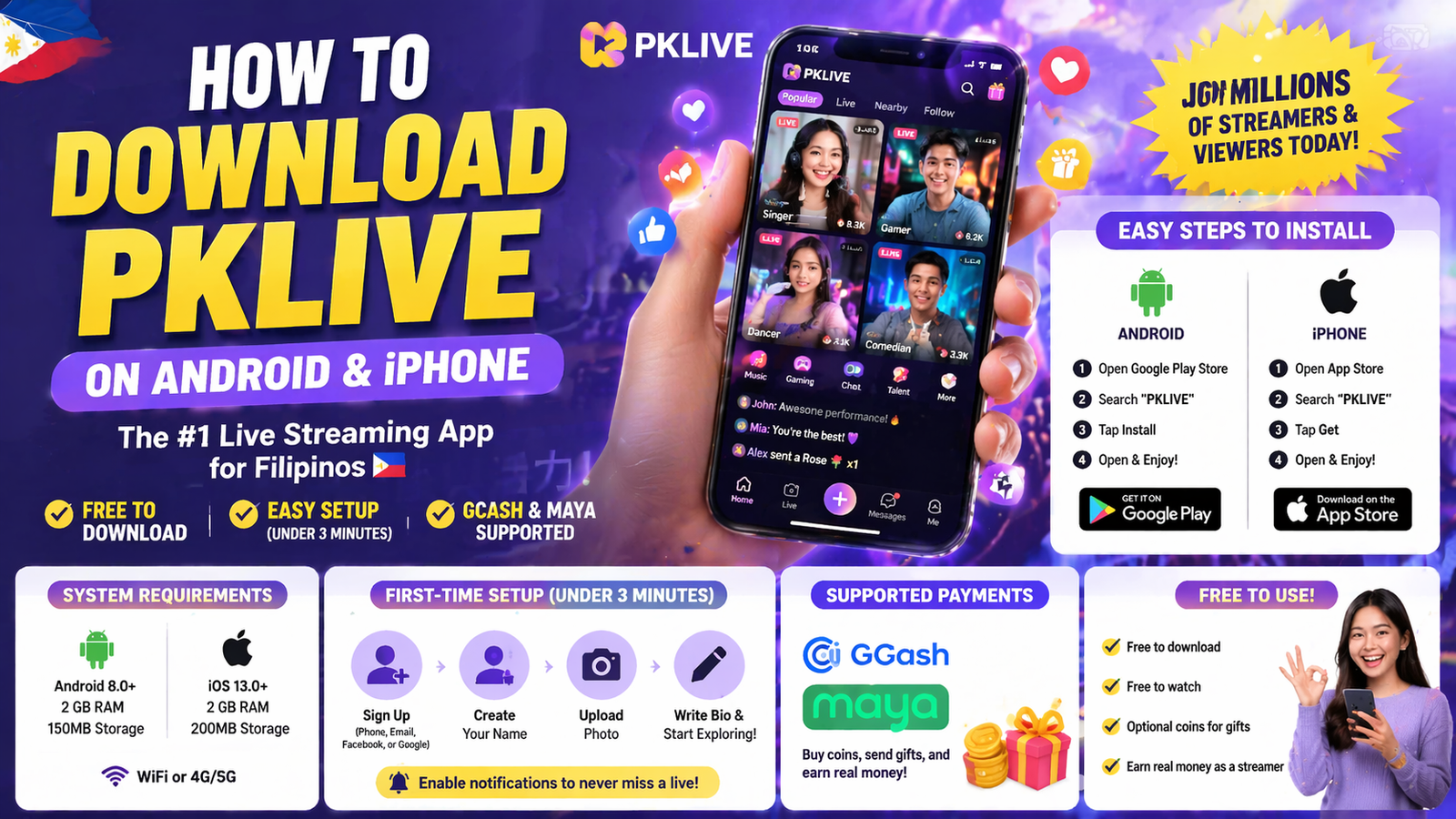
Quick Answer: To download PKLIVE in the Philippines, go to the Google Play Store (Android) or App Store (iPhone), search “PKLIVE,” and tap Install. The app is free, takes under 3 minutes to set up, and supports GCash and Maya for payments.
What Is PKLIVE?
PKLIVE is one of the most popular live streaming apps in the Philippines. Millions of Filipinos use it daily to watch entertainment, support their favorite streamers with virtual gifts, and earn real money from their broadcasts.
The app hosts singers, gamers, comedians, dancers, and everyday Filipinos who have turned live streaming into a career. Whether you want to watch or stream, PKLIVE is free to download on both Android and iPhone.
PKLIVE System Requirements: Android vs iPhone
Before you download, make sure your phone meets the minimum requirements. Most phones bought after 2019 will work without any issues.
| Requirement | Android | iPhone |
|---|---|---|
| Operating System | Android 8.0 or higher | iOS 13.0 or higher |
| Storage Space | At least 150 MB free | At least 200 MB free |
| RAM | 2 GB minimum | 2 GB minimum |
| Internet Connection | WiFi or 4G/5G | WiFi or 4G/5G |
| Camera | Required for streaming | Required for streaming |
| App Store | Google Play Store | Apple App Store |
How to Download PKLIVE on Android
Follow these steps to install PKLIVE on your Android phone:
- Open the Google Play Store on your Android phone.
- Tap the search bar at the top and type “PKLIVE”.
- Select the official PKLIVE app from the results — look for the verified developer name.
- Tap the green Install button.
- Wait for the download to finish — it usually takes 1 to 2 minutes on a good connection.
- Once installed, tap Open to launch the app.
Tip: If the Play Store says “This app is not available in your country,” try connecting to a different WiFi network or restart your phone and try again.
How to Download PKLIVE on iPhone
iPhone users follow a slightly different process through the App Store:
- Open the App Store on your iPhone.
- Tap the Search tab at the bottom of the screen.
- Type “PKLIVE” in the search bar and press Search.
- Find the official PKLIVE app and tap the Get button.
- Authenticate with Face ID, Touch ID, or your Apple ID password.
- The app will download and appear on your home screen automatically.
Tip: Make sure your iPhone has at least 200 MB of free storage before downloading. Go to Settings → General → iPhone Storage to check.
First-Time Setup: What to Do After Installing PKLIVE
Once the app is installed, setting up your account takes less than 3 minutes. Here is what to do step by step:
- Open PKLIVE and choose your sign-up method — you can use your phone number, email address, Facebook, or Google account.
- Create your streamer name. Choose something memorable and easy to search. This is the name your viewers will know you by.
- Upload a profile photo. A clear, smiling photo gets 3x more profile visits than a blurry or no-photo account.
- Write a short bio. Tell viewers who you are and what kind of content you stream. Keep it under 100 words.
- Browse and follow streamers in categories you enjoy — this teaches the algorithm your preferences and helps you discover similar content.
- Enable notifications so you never miss when your favorite streamers go live.

PKLIVE Not Installing? Common Problems and Fixes
If you are having trouble downloading or installing PKLIVE, check the table below for the most common issues and their solutions:
| Problem | Likely Cause | Solution |
|---|---|---|
| App won’t download | Poor internet connection | Switch to WiFi or move closer to your router. Restart the download. |
| “Not enough storage” error | Phone storage is full | Delete unused apps or photos to free up at least 200 MB of space. |
| “Not compatible with device” | OS version too old | Update your Android or iOS to the latest version available for your phone. |
| App crashes after opening | Outdated app version or cache issue | Uninstall the app, restart your phone, then reinstall from the store. |
| Can’t find app in store | Region restriction or wrong search | Search “PK LIVE” with a space, or access the direct link from pklive.pro. |
| Login fails after install | Wrong credentials or server issue | Try signing in with Google or Facebook instead of email/phone. |
Is PKLIVE Free to Use?
Yes — downloading and watching on PKLIVE is completely free. There are no subscription fees for viewers.
The only time you spend money on PKLIVE is when you choose to buy virtual coins to send gifts to streamers you want to support. These purchases are optional and start at very small amounts.
For streamers, the app is also free to use. You earn money through the gifts your viewers send you, which are paid out to your GCash, Maya, or bank account.
Frequently Asked Questions About Downloading PKLIVE
Is PKLIVE available in the Philippines?
Yes. PKLIVE is fully available in the Philippines on both Android and iPhone. It also supports Filipino payment methods including GCash and Maya for purchasing coins and withdrawing earnings.
How much storage does PKLIVE take up on my phone?
The initial download is around 150 to 200 MB. After several months of use, the app including cached data may grow to 400 to 600 MB. You can clear the app cache in your phone settings to free up space without losing your account.
Can I use PKLIVE on a tablet?
Yes. PKLIVE works on Android tablets and iPads as long as they meet the same OS requirements — Android 8.0+ or iOS 13.0+. The experience is very similar to using a phone.
Do I need to create an account to watch streams on PKLIVE?
You can browse some content without an account, but creating a free account lets you follow streamers, join chats, send gifts, and receive personalized recommendations from the algorithm.
Is PKLIVE safe to download?
Yes, as long as you download from the official Google Play Store or Apple App Store. Avoid downloading APK files from unofficial websites, as these may contain malware. The official app is safe and regularly updated by the PKLIVE development team.
Getting started on PKLIVE takes just a few minutes. Download the app now, set up your profile, and join millions of Filipinos already enjoying live entertainment — or building a career from it.