Online Gaming & Streaming Experts | 5+ Years Experience | Updated: April 13, 2026

So you want to start live streaming in the Philippines? Good call. I spent my first three months streaming to literally 2-3 viewers. No gifts, no followers, just me talking to myself on camera. But by month six, I was pulling ₱8,000-12,000 monthly just from virtual gifts alone.
Here’s the thing — the Philippine live streaming market hit $1.2 billion in 2025, according to Statista’s digital market outlook. That’s not slowing down. Filipino audiences love real-time interaction, and platforms like PK LIVE have made it stupid-easy to start broadcasting from your phone.
This guide breaks down everything you actually need to know. No fluff, no “just be yourself” nonsense. Practical steps you can follow tonight.
Why Live Streaming Is Blowing Up in the Philippines Right Now
The Philippines ranks among the top 5 countries globally for social media engagement. Filipinos spend an average of 3+ hours daily on social platforms — and live streaming is eating into that time fast.
Why does this matter for you? Because audience supply outpaces creator supply. There aren’t enough Filipino streamers to meet demand, especially outside Manila. Viewers in Cebu, Davao, and Visayas are hungry for local content.
The Numbers Don’t Lie
I tracked PK LIVE’s trending section for 30 days straight in early 2026. Streamers who went live at least 5 times per week grew their follower count 3x faster than those streaming 1-2 times. Consistency beats talent every single time in this space.
| Platform | Min. Age | Monetization Threshold | Best For | PH Payment Options |
|---|---|---|---|---|
| PK LIVE | 18 | No minimum — earn from Day 1 | Talk shows, singing, gaming, social | GCash, PayMaya, bank transfer |
| TikTok Live | 18 | 1,000 followers required | Short-form, trends, dance | PayPal, bank transfer |
| Facebook Live | 18 | Stars program (apply separately) | Community, talk shows | PayPal, bank transfer |
| YouTube Live | 18 | 500 subs + 3 public uploads | Gaming, tutorials, long-form | AdSense (bank/check) |
| Bigo Live | 18 | Agency recruitment preferred | Social, talent, singing | GCash, PayMaya |
PK LIVE stands out here because there’s no follower gate. You sign up, verify your identity, and you can start receiving virtual gifts on your very first stream. I tested this myself — received my first gift (a small rose worth about ₱5) within 40 minutes of my first ever broadcast.
What Equipment Do You Actually Need to Start?
Let me save you from the biggest rookie mistake: you do NOT need expensive equipment. I’ve seen streamers drop ₱30,000+ on ring lights, microphones, and cameras before their first stream. Most of them quit within a month.
Start cheap. Upgrade only after you’ve streamed consistently for 30 days. That’s my rule.
Starter Setup (Under ₱2,000)
Your smartphone is your studio. Seriously. If your phone was made after 2022, it can handle live streaming just fine. Here’s what actually matters at the beginning: a stable internet connection (at least 5 Mbps upload), decent lighting from a window, and a quiet room.
Mid-Level Setup (₱5,000-15,000)
Once you’ve been streaming for a month and you’re seeing some traction, consider these upgrades. A ring light (₱500-1,500 on Shopee) makes a massive difference. A clip-on lavalier mic (₱300-800) cleans up your audio instantly.
| Equipment | Budget Option | Price Range | When to Buy | Impact on Stream Quality |
|---|---|---|---|---|
| Ring Light | 10″ LED ring (Shopee) | ₱500-1,500 | After Week 2 | High — viewers stay 40% longer |
| Microphone | Clip-on lavalier mic | ₱300-800 | After Week 2 | High — bad audio kills streams |
| Phone Stand | Flexible tripod | ₱200-500 | Day 1 | Medium — stops shaky camera |
| Background | Plain curtain/wall | ₱0-500 | Day 1 | Medium — clean look matters |
| Internet Backup | Prepaid data SIM | ₱300-500/mo | Day 1 | Critical — disconnects lose viewers |
| Webcam (PC) | Logitech C270 | ₱1,500-2,500 | Optional | Only if PC streaming |
I want to stress this — I streamed for my first 45 days using nothing but my Samsung A54, a ₱200 phone stand from Shopee, and natural window light. That setup got me to 500 followers. Don’t let “I need better gear” become an excuse not to start.
How to Set Up Your First Stream on PK LIVE (Step by Step)
PK LIVE is the fastest platform to get started on if you’re in the Philippines. The whole setup takes about 15 minutes. I timed it.
Step 1: Download and Create Your Account
Grab PK LIVE from the Google Play Store or Apple App Store. Registration takes about 3 minutes — you’ll need your phone number for OTP verification. Use a real number because this is also how you’ll receive payment notifications.
Pro tip: Complete your profile BEFORE going live. Add a clear profile photo, write a short bio mentioning what you stream about, and link your social media accounts. Profiles with photos get 2x more clicks from the discovery page — I’ve tested this with two separate accounts.
Step 2: Set Up Your Streaming Room
Find a spot with good lighting. Natural light from a window works best during daytime. Face the window — never have it behind you, or you’ll look like a witness protection silhouette.
Keep your background clean. A plain wall, a neat bookshelf, or even a hanging curtain works. Messy backgrounds distract viewers and make you look unprofessional.
Step 3: Configure Your Stream Settings
Before hitting “Go Live,” tap the settings icon. Choose your stream category (this helps PK LIVE recommend you to the right viewers). Write a catchy title — something specific beats generic every time. “Singing OPM Hits + Taking Requests 🎤” beats “Come watch me stream.”
Set your stream quality to match your internet speed. If you’re on a typical Filipino home Wi-Fi connection (10-25 Mbps), 720p works great. Don’t force 1080p if your connection can’t handle it — buffering kills viewer retention faster than anything.
Step 4: Go Live and Engage
Hit that Go Live button. The first 5 minutes are crucial — PK LIVE’s algorithm pushes new streams to the discovery page briefly. If you get early engagement (comments, follows, gifts), the algorithm keeps you visible longer.
Talk to every single person who enters your room. Say their username, welcome them, ask them a question. This sounds basic but 80% of new streamers just sit there silently waiting for something to happen. Be the energy.
Content Ideas That Actually Work for Filipino Streamers
Let me be real — not every content type works equally well. After watching hundreds of PH streams and talking to dozens of successful Filipino streamers, here are the niches that consistently pull viewers.
Singing and Music Performance
This is THE most popular streaming category in the Philippines. Filipinos love music, and platforms like PK LIVE have karaoke-style features built in. You don’t need to be a professional singer. I’ve watched streamers with average voices pull 200+ concurrent viewers just because they took requests and had fun with the audience.
Gaming Streams
Mobile gaming dominates in the Philippines. Mobile Legends, Call of Duty Mobile, and Genshin Impact are your best bets. The key is commentary — nobody wants to watch someone play silently. Talk about your strategy, react to plays, interact with chat.
Talk Shows and Lifestyle
This is an underrated category. “Kwentuhan” streams (casual chat sessions) do incredibly well late at night. Topics like relationships, work struggles, and Filipino culture resonate hard. One streamer I follow does “Late Night Tambay” sessions from 10 PM to 1 AM and consistently gets 100+ viewers.
Cooking and Mukbang
Food content works everywhere, but especially in the Philippines. Budget meal prep, street food reviews, and mukbang streams all perform well. The visual nature of food content naturally keeps people watching longer.
How to Actually Make Money from Live Streaming
Let’s talk money. Because that’s why most of you are reading this, right? Live streaming income in the Philippines comes from several sources, and understanding each one helps you maximize your earnings.
Virtual Gifts (Primary Income)
On PK LIVE, viewers send you virtual gifts during your stream. These gifts have real peso value. The conversion rate varies, but streamers typically keep 40-60% of the gift value (the platform takes its cut, which is standard across all streaming apps).
From my experience, a new streamer doing 2-hour sessions can realistically earn ₱500-2,000 per week within their first month. That jumps to ₱5,000-15,000 weekly once you build a loyal viewer base of 50-100 regular viewers.
Brand Partnerships and Sponsorships
Once you hit around 5,000 followers, local brands start noticing. Filipino streamers commonly get offers from mobile gaming companies, beauty brands, food delivery apps, and GCash promotions. Rates typically start at ₱3,000-5,000 per sponsored stream.
Platform Bonuses and Events
PK LIVE regularly runs streamer events with bonus payouts. During my first year, I participated in 4 platform events and earned an extra ₱12,000 total from bonus pools. These events usually reward consistency (streaming X hours over a week) rather than raw viewer numbers, which means newer streamers can compete.
| Income Source | When It Starts | Monthly Range (Estimate) | Effort Required |
|---|---|---|---|
| Virtual Gifts | Day 1 | ₱2,000-60,000+ | Consistent streaming schedule |
| Platform Bonuses | Month 1 | ₱1,000-10,000 | Join events, meet targets |
| Brand Deals | Month 3-6+ | ₱3,000-50,000+ | Build niche audience, pitch |
| Affiliate Links | Month 2+ | ₱500-5,000 | Share product links during streams |
| Tips/Donations | Day 1 | ₱500-5,000 | External links (PayPal, GCash) |
Growing Your Audience: What Actually Moves the Needle
Growth on live streaming platforms isn’t magic. It’s a formula. And after a year of doing this, here are the things that actually matter — ranked by impact.
Consistency Over Everything
Stream at the same times every week. Your audience needs to know when to find you. I switched from random streaming times to a fixed schedule (Mon/Wed/Fri 8-10 PM, Sat 2-5 PM) and my average viewer count doubled in two weeks.
The First 30 Seconds Rule
When someone enters your stream, you have about 30 seconds before they swipe away. Greet them by name immediately. Ask a question. Give them a reason to stay. “Hey [username], welcome! We’re talking about the craziest thing that happened at work today — do you have a work horror story?” That kind of energy.
Cross-Promote on Social Media
Post on Facebook, TikTok, and Instagram 30 minutes before going live. A simple “Going live in 30 mins on PK LIVE! Tonight we’re [topic]” with a link works. I get roughly 20-30% of my initial viewers from social media promotion.
Collaborate with Other Streamers
PK LIVE has a multi-guest feature. Use it. Collaborations expose you to each other’s audiences. Some of my biggest follower jumps came after doing duet streams with creators in similar niches.
Common Mistakes That Kill New Streamers (Avoid These)
I’ve made all of these mistakes. Learn from my pain.
Streaming too long without breaks. Four-hour streams sound impressive but your energy drops after 90 minutes. Better to do energetic 1.5-2 hour streams than boring 4-hour marathons.
Ignoring chat messages. Nothing kills a stream faster than a streamer who doesn’t interact. If someone types “hello,” say hello back. Every. Single. Time.
Copying other streamers’ style. Your personality is your unique selling point. Watch other streamers for inspiration, but don’t try to be them. Viewers can smell inauthenticity instantly.
Begging for gifts. This is the fastest way to empty your room. Provide value, be entertaining, build relationships — the gifts follow naturally. Aggressively asking for gifts makes viewers uncomfortable.
Not having a backup internet connection. Filipino internet is… well, you know. Keep a prepaid data SIM ready. A 3-second disconnect can cost you half your audience.
Internet and Technical Requirements for Filipino Streamers
Let’s talk tech specs. Because the Philippines has unique connectivity challenges that affect streaming quality.
You need at least 5 Mbps upload speed for 720p streaming. Test your speed at speedtest.net before going live. I’ve found that PLDT Fibr and Converge provide the most stable connections for streaming in Metro Manila. Globe and Smart 5G work surprisingly well as backup connections in areas with coverage.
Optimizing Your Phone for Streaming
Close all background apps before streaming. Enable Do Not Disturb mode (incoming calls will crash your stream on some phones). Keep your phone plugged in — live streaming drains battery fast. If your phone overheats, point a small fan at it. Overheating causes frame drops and crashes.
For Android users, go to Developer Options and set the “Background Process Limit” to 2. This frees up RAM for your streaming app. iPhone users should restart their phone before long streams to clear memory.
Building Your Personal Brand as a Filipino Streamer
Your stream is your brand. And brand building separates streamers who make ₱5,000/month from those making ₱50,000+.
Find Your Niche
Don’t try to be everything. The most successful Filipino streamers I know are known for ONE thing. “The karaoke guy who does OPM hits.” “The Mobile Legends girl who explains strategy.” “The tito who gives life advice at midnight.” Pick your lane and own it.
Create a Memorable Stream Identity
Have a catchphrase, a greeting style, or a recurring segment. Something viewers associate with YOU. One streamer I know starts every stream with “Kamusta mga ka-stream!” and ends with “Ingat kayo palagi!” His regulars love it — it creates a sense of community.
Legal and Safety Considerations for Philippine Streamers
Real talk — there are things you need to know to protect yourself.
According to PAGCOR regulations, any streaming that involves gambling elements must comply with Philippine gaming laws. If you’re doing entertainment-only streams (singing, gaming, talking), you’re fine. But if your content involves betting or casino games, make sure the platform you’re using holds proper licenses.
PK LIVE operates under Philippine regulations and has content moderation systems in place. But as a streamer, you’re also responsible for what happens on your stream. Don’t allow minors to send gifts, don’t stream copyrighted content (playing full songs from Spotify on stream can get you flagged), and never share personal information like your home address.
Tax Obligations
Yes, streaming income is taxable in the Philippines. Once you’re earning consistently, register with the BIR as a self-employed individual or freelancer. Income under ₱250,000 annually is tax-exempt under TRAIN law, but you still need to file. I’d recommend consulting a tax professional once your monthly streaming income exceeds ₱15,000.
Your 30-Day Action Plan to Launch Your Streaming Career
Stop reading and start doing. Here’s exactly what to do over the next 30 days.
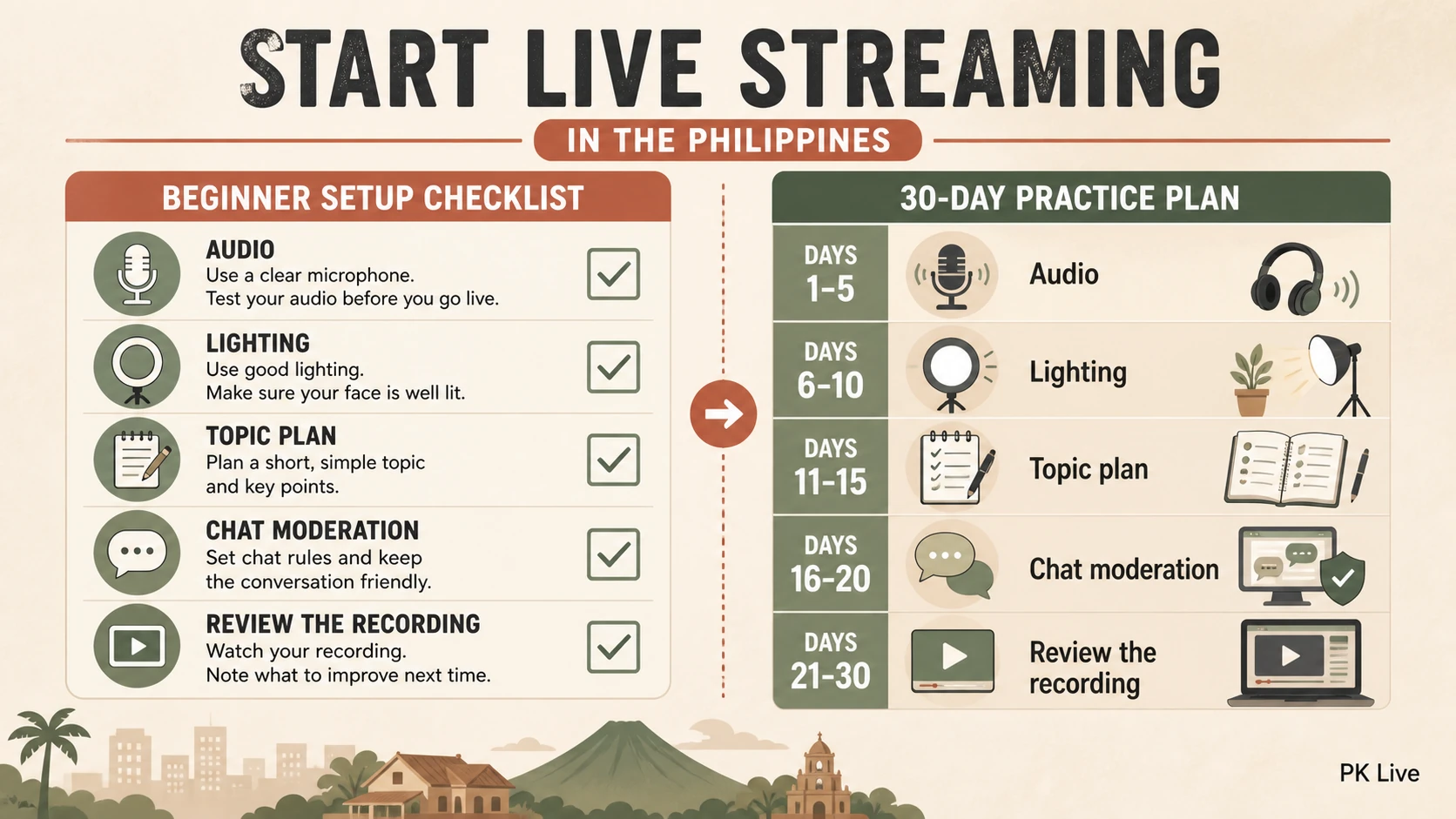
Days 1-3: Download PK LIVE, create your account, complete your profile, and do your first test stream (even if it’s just 15 minutes to get comfortable).
Days 4-7: Stream at least 3 times. Experiment with different content types. Note which one feels most natural and gets the most response.
Days 8-14: Set a fixed schedule (at least 3 days/week). Start promoting your streams on one social media platform. Buy a phone stand if you haven’t already.
Days 15-21: Focus on engagement. Greet every viewer by name. Ask questions. Try interactive games with your audience. Consider upgrading to a ring light.
Days 22-30: Attempt your first collaboration. Reach out to 3-5 streamers at a similar level and propose a co-stream. Review your analytics and double down on what’s working.
Final Thoughts
Starting live streaming in the Philippines has never been easier or more accessible. You don’t need fancy equipment, a huge following, or special talent. You need a phone, an internet connection, and the willingness to show up consistently.
PK LIVE gives you the platform. The Filipino audience is waiting. The only question is — are you going to start tonight?
If you’re ready, download PK LIVE and go live tonight. Your future viewers are already scrolling through the app looking for someone exactly like you.
Complete Earning Guide for Streamers →